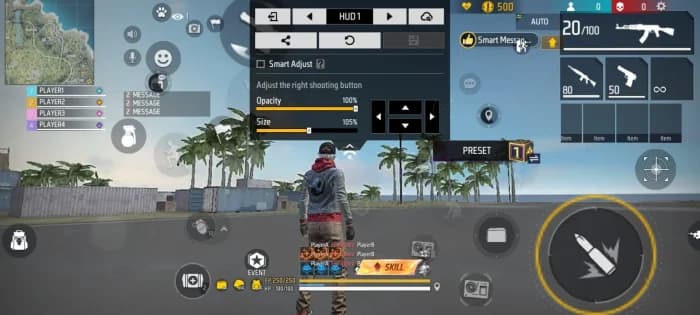
Two Finger Player Pro
Master your gameplay with this optimized Free Fire 2-Finger HUD Layout, designed for players who want better movement, faster reactions, and easier aim control. This HUD provides a comfortable button placement for drag headshots, quick weapon switching, jump + shoot combos, gloo wall placement, and
HUD Layout Share Code
Copy and paste this code in your Free Fire settings
Master your gameplay with this optimized Free Fire Two Finger Player HUD Layout, designed for players who want better movement, faster reactions, and easier aim control. This HUD provides a comfortable button placement for drag headshots, quick weapon switching, jump + shoot combos, gloo wall placement, and close-range fights.
🔥 Perfect for: 2-Finger Players | Headshots | Drag Shots | Ranked Matches | Clash Squad | Fast Movement
Why use this HUD?
⚡ Faster reaction & button access
🎯 Better headshot control
🏃 Smooth movement and sprinting
🔫 Easy weapon switching
🧱 Quick Gloo Wall placement
📱 Comfortable layout for mobile players
Try this Free Fire HUD Setting and adjust the button size/position according to your device and playstyle.